
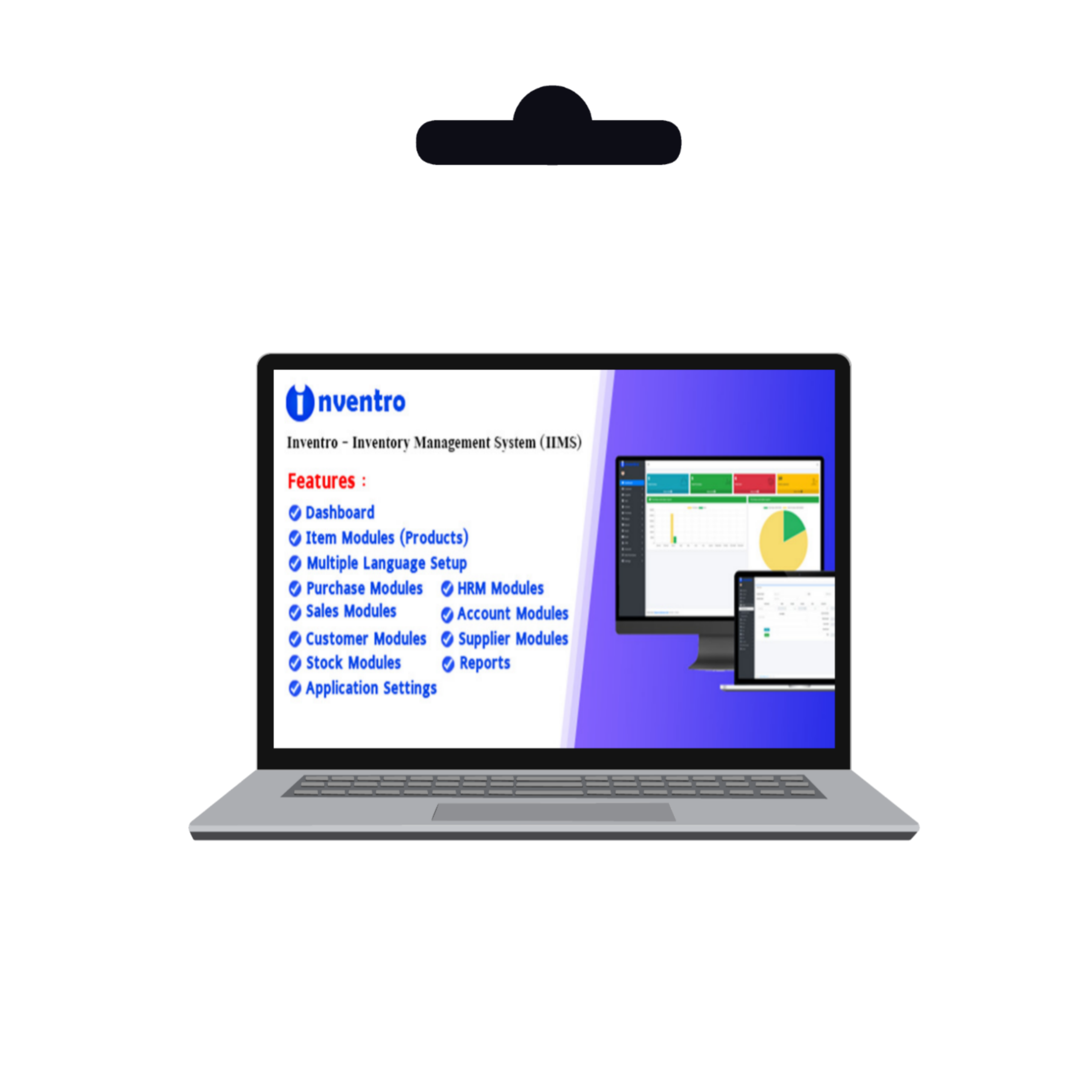
Inventro – Inventory Management System
Original price was: ₨ 999.00.₨ 499.00Current price is: ₨ 499.00.
| Category | Scripts & Code / PHP Scripts / Management / Inventory |
| First release | 22 March 2025 |
| Last update | 22 March 2025 |
| Software version | PHP 7.2, PHP 7.3, PHP 7.4, PHP 8.0, PHP 8.1, PHP 8.2 |
| Files included | .php, .css, .html, .sql, Javascript .js |
| Database | MySQL 4.x, MySQL 5.x |
| JavaScript Framework | jQuery, Backbone.js, Node.js |
| Tags | stock management, Barcode Scanner, business management, inventory system, POS System, inventory tracking, warehouse management, product management, inventory control, supply chain, order management, retail software, erp software, stock tracking, inventory automation |

Overview
Inventro is ideal for small businesses, shops, and companies of all types. It offers comprehensive features for accounting, inventory management, invoicing, user management, and data analysis.
Before installing Inventro, ensure your localhost (XAMPP/WAMP) or server (cPanel) meets the following requirements:
> MySQL Version: 5.0.12 or higher
> PHP Version: 7.4 or higher
> Apache: 2.4.18 or higher
Key Features of Inventro
Item Management
Easily add, edit, and delete items, and manage them efficiently.
Supplier Management
Add, edit, and delete suppliers, and manage supplier details seamlessly.
Customer Management
Add, edit, and delete customers, and manage customer information effectively.
Product Purchase
Track product purchases and analyze profit and loss in real-time.
Invoice Management
Generate and manage invoices for product purchases and sales effortlessly.
Stock Management
Monitor and manage your inventory with a robust stock management system.
Accounting
Manage your business finances with an integrated accounting system.
HR Management
Streamline HR processes with employee management, attendance tracking, and payroll.
Reporting
Generate detailed reports for sales, purchases, and inventory.
Menu Permissions
Assign roles and permissions to users for secure access control.
Sales Reports
Track daily sales and analyze business performance.
Purchase Reports
Monitor daily purchase activities and manage supplier transactions.
System Requirements
To ensure optimal performance, Inventro requires the following server configuration. Please note that performance may vary based on hosting environment, server configuration, and traffic volume.
Server Requirements:
Apache, IIS, or Nginx
PHP version 7.4 or higher (recommended: PHP 7.4+)
MySQL version 5.0 or higher (recommended: MySQL 5.5+)
Hosting Recommendations
Your hosting plan should be chosen based on your expected traffic. For high-traffic websites, we recommend using a VPS or dedicated server from a reputable hosting provider.
Included Files
Inventro includes the following files and resources:
- HTML, CSS, and JavaScript files
- PHP scripts
- CodeIgniter Framework
- MySQL database
- Full documentation
- Installer
- Licensing information
- Main application ZIP file (inventro_main.zip)
- Update log
Installation Guide
- Extract the inventro_main.zip file. You will find the main application folder and a documentation folder. Please read the documentation before proceeding.
- Upload the inventro_main.zip file to your server using cPanel or FTP.
- Extract the uploaded ZIP file on your server.
- Move all files and folders (e.g., application, admin_assets, index.php, install, and system) to your public_html directory or a subfolder. Ensure the .htaccess file is correctly placed to avoid access issues.
- Navigate to http://yourdomain.com/install to begin the installation process. If all requirements are met, click the Next button.
Features
Responsive Design: Seamlessly works on desktops, tablets, and mobile devices.
Multi-Store System: Manage multiple stores or branches from a single platform.
Installment Payment System: Handle installment-based transactions with ease.
Purchase Order Management: Create and track purchase orders efficiently.
Comprehensive Accounting Module: Manage expenses, income, and financial reports.
Inventory Management: Monitor stock levels, product categories, and sales performance.
Invoice Management: Generate and manage professional invoices effortlessly.
User Management: Assign roles and permissions to ensure secure access control.
Data Analysis Tools: Get detailed insights through reports and analytics.
Requirements
Need this for installation this application
Inventro is a modern and responsive inventory management system designed to streamline business operations. Built using PHP and the CodeIgniter framework, Inventro is ideal for small businesses, shops, and companies of all types. It offers comprehensive features for accounting, inventory management, invoicing, user management, and data analysis.
Before installing Inventro, ensure your localhost (XAMPP/WAMP) or server (cPanel) meets the following requirements:
> MySQL Version: 5.0.12 or higher
> PHP Version: 7.4 or higher
> Apache: 2.4.18 or higher
>Chrome
>Edge
>Firefox
Instructions
Installation Guide
- Extract the inventro_main.zip file. You will find the main application folder and a documentation folder. Please read the documentation before proceeding.
- Upload the inventro_main.zip file to your server using cPanel or FTP.
- Extract the uploaded ZIP file on your server.
- Move all files and folders (e.g., application, admin_assets, index.php, install, and system) to your public_html directory or a subfolder. Ensure the .htaccess file is correctly placed to avoid access issues.
- Navigate to http://yourdomain.com/install to begin the installation process. If all requirements are met, click the Next button.
Only logged in customers who have purchased this product may leave a review.
Related products

Gdplayer+Movienine Bundle Packs

NeoFile-Upload & File Share & Earn Money PPD Platform

PHP HLS/M3U8/MP4 Reverse Proxy Solution for Fixing Cross-Origin Streaming Issues

The Best 50+ PHP Script Bundle – Video Player Google Drive & Themes Movies & Other Scripts
WeStream-Video Player & Loadblancer, Proxy Rotate, Multiply Links Servers & Support M3U8





















Reviews
Clear filtersThere are no reviews yet.